---
title: How to add Yelp credentials?
description: Step by step introductions to connecting with Yelp.
---

[Skip to content](https://help.localistico.com/knowledge/how-to-add#main-content)

English

Show submenu for translations

[Go to Customer Portal](https://help.localistico.com/tickets?hsLang=en)

![logo](https://help.localistico.com/hubfs/logo.svg)

- [Help & Support](https://help.localistico.com/knowledge)
- [Go to Localistico](https://localistico.com/)

Open main navigation

Close main navigation

- [Help & Support](https://help.localistico.com/knowledge)
- [Go to Localistico](https://localistico.com/)
- English
  
  Show submenu for translations
- [Go to Customer Portal](https://help.localistico.com/tickets)

 Hi! 👋 What can we help you with?

- There are no suggestions because the search field is empty.

1. [Help & Support](https://help.localistico.com/knowledge?hsLang=en)
2. [Platforms and Credentials](https://help.localistico.com/knowledge/platforms-and-credentials?hsLang=en)
3. [Credentials](https://help.localistico.com/knowledge/platforms-and-credentials?hsLang=en#credentials)

# How to add Yelp credentials?

## Step-by-step instructions for connecting Yelp to Localistico.

To publish to Yelp, you need **two separate Yelp accounts** connected to Localistico: a Personal account and a Business account. They’re two different Yelp websites, so adding the same login twice won’t work.

- Create your Personal account on [Yelp](https://www.yelp.com/).
- Create your Business account on [Yelp for Business](https://biz.yelp.com/).

**Claim a profile with your Business account**

Once your Business account is set up, find one of your locations on Yelp and click **Claim this business**. Yelp then checks that you’re the owner, usually by calling that location’s phone number and asking for a code shown on your screen. Let the location know beforehand so someone is ready to take the call.

You only need to claim one profile to start publishing. Here’s how the two account types work:

- **Profiles you haven’t claimed** are updated through your Personal account. We send your data to Yelp as suggestions, and Yelp’s moderators generally accept them.
- **Profiles claimed under your Business account** are updated directly.

If you want to reply to Yelp reviews, you’ll need to claim each of those profiles with your Business account. You can read more about claiming in [Yelp’s guide](https://www.yelp-support.com/Claiming_your_Business_Page?l=es_ES&biz=1).

**Add both accounts to Localistico**

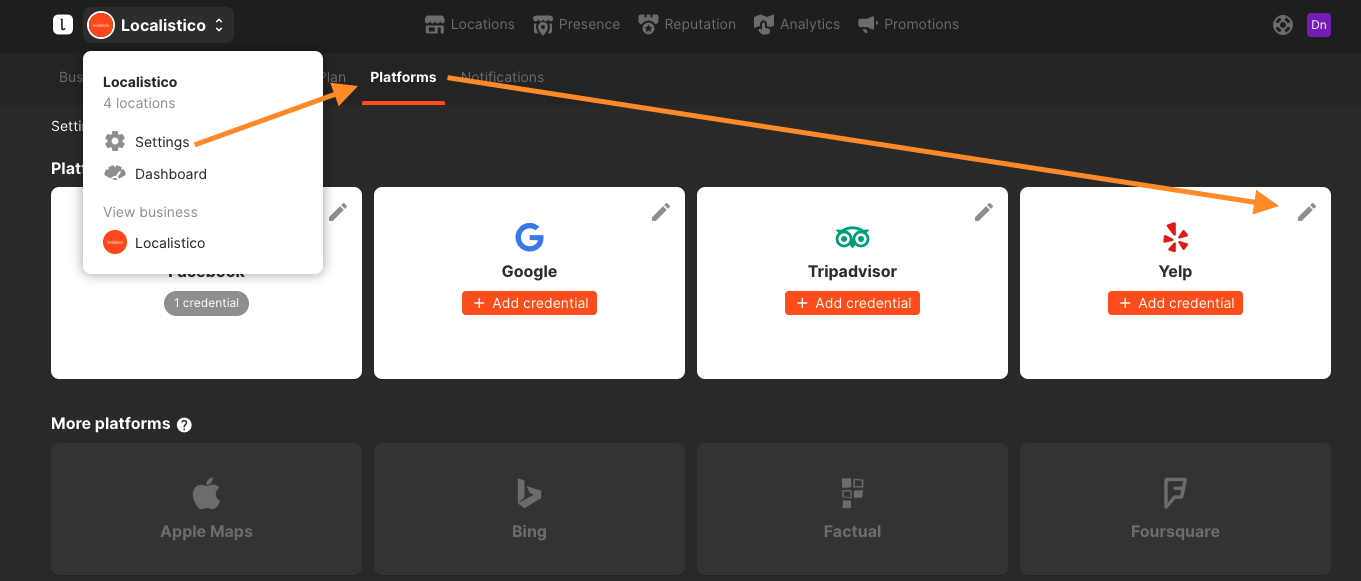
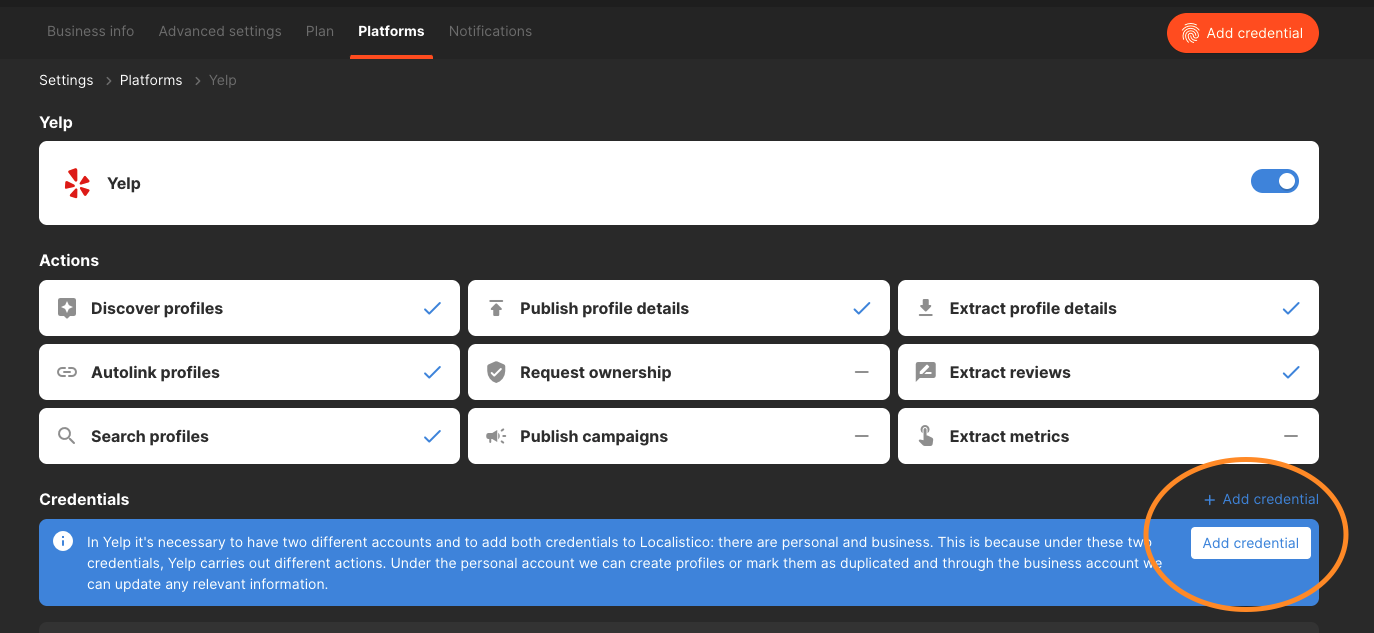
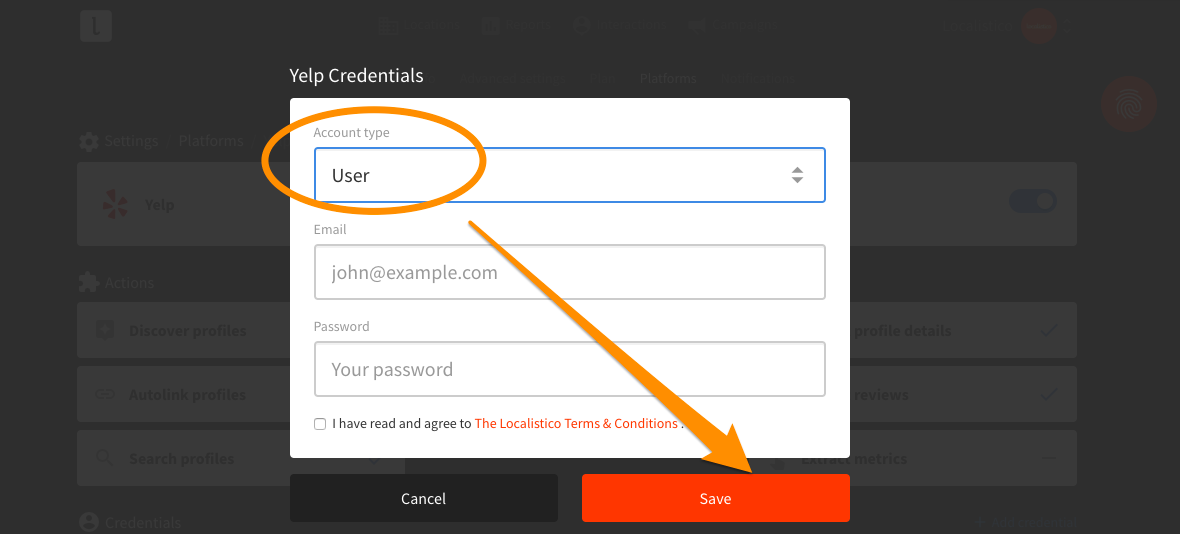
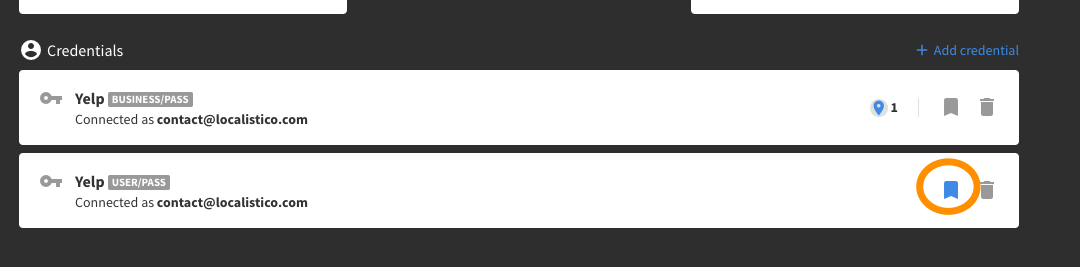
In Localistico, go to **Connections → Add credentials**, select Yelp, and add both your **Personal account** and your **Business account**.

- [Getting Started](https://help.localistico.com/knowledge/getting-started?hsLang=en#main-content)

    - [Basic Settings](https://help.localistico.com/knowledge/getting-started?hsLang=en#basic-settings)
    - [Business Structure](https://help.localistico.com/knowledge/getting-started?hsLang=en#business-structure)
    - [Integrations](https://help.localistico.com/knowledge/getting-started?hsLang=en#integrations)
    - [Onboarding](https://help.localistico.com/knowledge/getting-started?hsLang=en#onboarding)
- [Frequently Asked Questions](https://help.localistico.com/knowledge/frequently-asked-questions?hsLang=en)
- [Locations](https://help.localistico.com/knowledge/locations?hsLang=en#main-content)

    - [action links](https://help.localistico.com/knowledge/locations?hsLang=en#action-links)
- [Presence Management](https://help.localistico.com/knowledge/presence-management?hsLang=en#main-content)

    - [An overview of profiles](https://help.localistico.com/knowledge/presence-management?hsLang=en#an-overview-of-profiles)
    - [Claiming profile ownership](https://help.localistico.com/knowledge/presence-management?hsLang=en#claiming-profile-ownership)
    - [Duplicated profiles](https://help.localistico.com/knowledge/presence-management?hsLang=en#duplicated-profiles)
    - [Publications](https://help.localistico.com/knowledge/presence-management?hsLang=en#publications)
- [Reputation Management (Reviews, Q&A & Messages)](https://help.localistico.com/knowledge/reputation-management-reviews-qa-messages?hsLang=en#main-content)

    - [Q&A](https://help.localistico.com/knowledge/reputation-management-reviews-qa-messages?hsLang=en#qa)
    - [Reviews](https://help.localistico.com/knowledge/reputation-management-reviews-qa-messages?hsLang=en#reviews)
    - [Private Messages](https://help.localistico.com/knowledge/reputation-management-reviews-qa-messages?hsLang=en#private-messages)
    - [Metrics](https://help.localistico.com/knowledge/reputation-management-reviews-qa-messages?hsLang=en#metrics)
- [Analytics (Metrics & Reports)](https://help.localistico.com/knowledge/analytics-metrics-reports?hsLang=en#main-content)

    - [Metrics](https://help.localistico.com/knowledge/analytics-metrics-reports?hsLang=en#metrics)
    - [Reports](https://help.localistico.com/knowledge/analytics-metrics-reports?hsLang=en#reports)
- [Promotions (Paid Ads and Post Campaigns)](https://help.localistico.com/knowledge/promotions-paid-ads-and-post-campaigns?hsLang=en#main-content)

    - [Google Ads](https://help.localistico.com/knowledge/promotions-paid-ads-and-post-campaigns?hsLang=en#google-ads)
    - [Facebook Posts](https://help.localistico.com/knowledge/promotions-paid-ads-and-post-campaigns?hsLang=en#facebook-posts)
    - [Google Posts](https://help.localistico.com/knowledge/promotions-paid-ads-and-post-campaigns?hsLang=en#google-posts)
    - [Instagram Posts](https://help.localistico.com/knowledge/promotions-paid-ads-and-post-campaigns?hsLang=en#instagram-posts)
    - [Post comments](https://help.localistico.com/knowledge/promotions-paid-ads-and-post-campaigns?hsLang=en#post-comments)
- [AI](https://help.localistico.com/knowledge/ai?hsLang=en)
- [Photos](https://help.localistico.com/knowledge/photos?hsLang=en)
- [Users and Passwords](https://help.localistico.com/knowledge/users-and-passwords?hsLang=en#main-content)

    - [Users](https://help.localistico.com/knowledge/users-and-passwords?hsLang=en#users)
    - [Passwords](https://help.localistico.com/knowledge/users-and-passwords?hsLang=en#passwords)
- [Settings](https://help.localistico.com/knowledge/settings?hsLang=en#main-content)

    - [Business Info](https://help.localistico.com/knowledge/settings?hsLang=en#business-info)
    - [Advanced Settings](https://help.localistico.com/knowledge/settings?hsLang=en#advanced-settings)
- [Platforms and Credentials](https://help.localistico.com/knowledge/platforms-and-credentials?hsLang=en#main-content)

    - [Platforms](https://help.localistico.com/knowledge/platforms-and-credentials?hsLang=en#platforms)
    - [Credentials](https://help.localistico.com/knowledge/platforms-and-credentials?hsLang=en#credentials)
- [Store Pages Portal](https://help.localistico.com/knowledge/store-pages-portal?hsLang=en#main-content)

    - [Getting Started](https://help.localistico.com/knowledge/store-pages-portal?hsLang=en#getting-started)
    - [Store Pages Portal - An Overview](https://help.localistico.com/knowledge/store-pages-portal?hsLang=en#store-pages-portal-an-overview)
    - [Store Pages Portal - Locations](https://help.localistico.com/knowledge/store-pages-portal?hsLang=en#store-pages-portal-locations)
    - [Store Pages Portal - Areas](https://help.localistico.com/knowledge/store-pages-portal?hsLang=en#store-pages-portal-areas)
    - [Store Pages Portal - Pages](https://help.localistico.com/knowledge/store-pages-portal?hsLang=en#store-pages-portal-pages)
    - [Store Pages Portal - Custom Attributes](https://help.localistico.com/knowledge/store-pages-portal?hsLang=en#store-pages-portal-custom-attributes)
    - [Store Pages Portal - Settings](https://help.localistico.com/knowledge/store-pages-portal?hsLang=en#store-pages-portal-settings)
    - [Store Pages Portal - Domains](https://help.localistico.com/knowledge/store-pages-portal?hsLang=en#store-pages-portal-domains)
    - [Store Pages Portal - Themes](https://help.localistico.com/knowledge/store-pages-portal?hsLang=en#store-pages-portal-themes)
- [Plan & Billing](https://help.localistico.com/knowledge/plan-billing?hsLang=en)
- [Accounts Portal](https://help.localistico.com/knowledge/accounts-portal?hsLang=en)

- [Go to Localistico](https://localistico.com/)
- [Customer Portal](https://help.localistico.com/_hcms/mem/login?redirect_url=https%3A%2F%2Fhelp.localistico.com%2Ftickets)
- [Help & Support](https://help.localistico.com/knowledge)

[![logo (1)](https://help.localistico.com/hubfs/logo%20(1).svg "logo (1)")](http://localistico.com)

© Localistico 2020

<https://www.facebook.com/localistico> <https://twitter.com/localistico> <https://www.linkedin.com/company/localistico/>