---
title: How to manage Google Menu with Localistico?
description: Create and update your menu on Google easily with Localistico. Let your customers know what you're offering.
---
[Skip to content](https://help.localistico.com/knowledge/how-to-manage-google-menu-with-localistico#main-content)
English
Show submenu for translations
[Go to Customer Portal](https://help.localistico.com/tickets?hsLang=en)

- [Help & Support](https://help.localistico.com/knowledge)
- [Go to Localistico](https://localistico.com/)
Open main navigation
Close main navigation
- [Help & Support](https://help.localistico.com/knowledge)
- [Go to Localistico](https://localistico.com/)
- English
Show submenu for translations
- [Go to Customer Portal](https://help.localistico.com/tickets)
Hi! 👋 What can we help you with?
- There are no suggestions because the search field is empty.
1. [Help & Support](https://help.localistico.com/knowledge?hsLang=en)
2. [Locations](https://help.localistico.com/knowledge/locations?hsLang=en)
# How to manage Google Menu with Localistico?
## Create and update your menu on Google easily with Localistico. Let your customers know what you're offering.
**Google Menu** is a feature designed for business owners—mainly restaurants, cafés, and other food-related businesses—to showcase their offerings to customers. By providing a clear menu, your customers can quickly find a place that suits their needs, such as a restaurant with vegetarian options.
While Google Menu is a Google feature, Localistico can also publish your menu information on your business’s store pages.
**Note:** Menu is a premium feature and may not be included in your subscription. If you are interested, please contact your Customer Success Manager
### How to add a menu manually in Localistico?
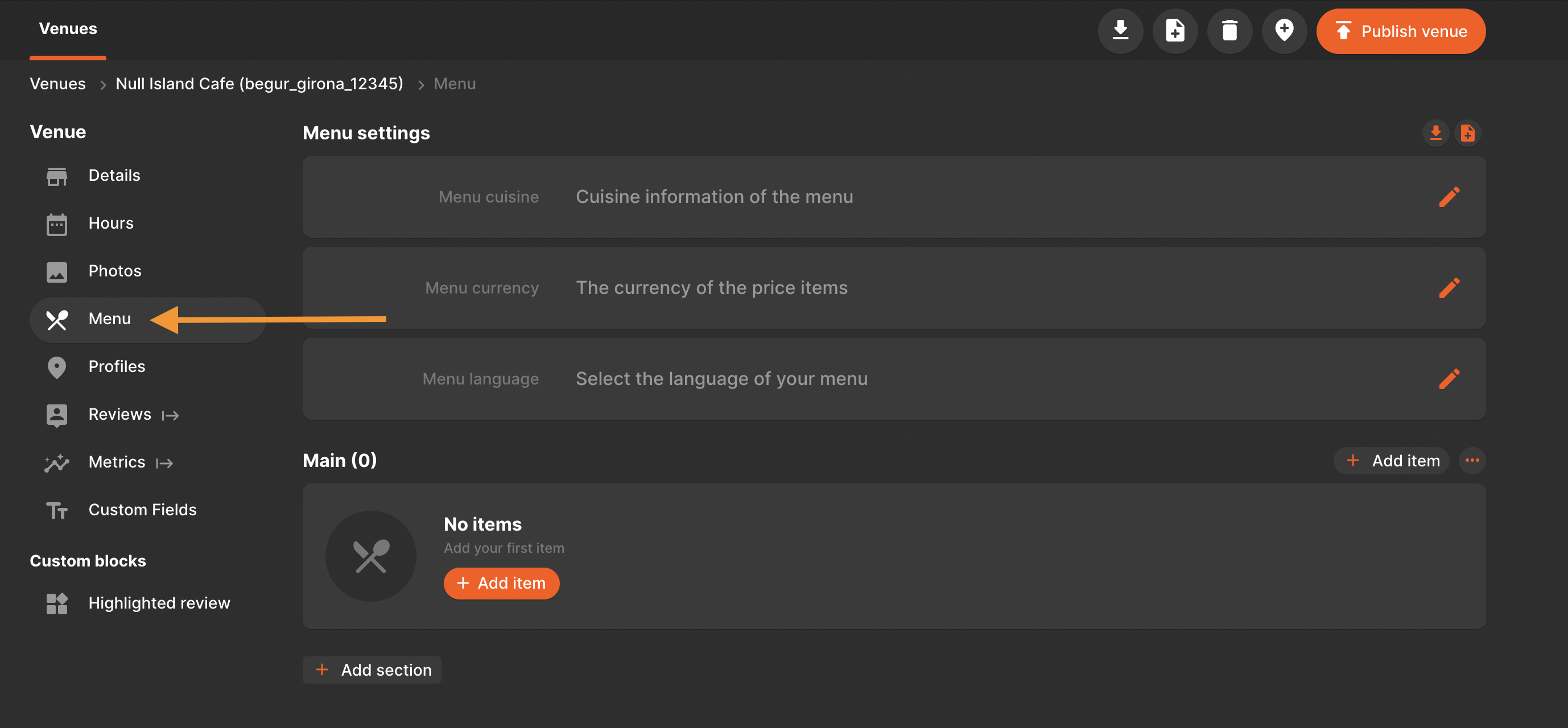
1\. Once the menu section is enabled, navigate to the venue you want to edit and open the **Menu** section.
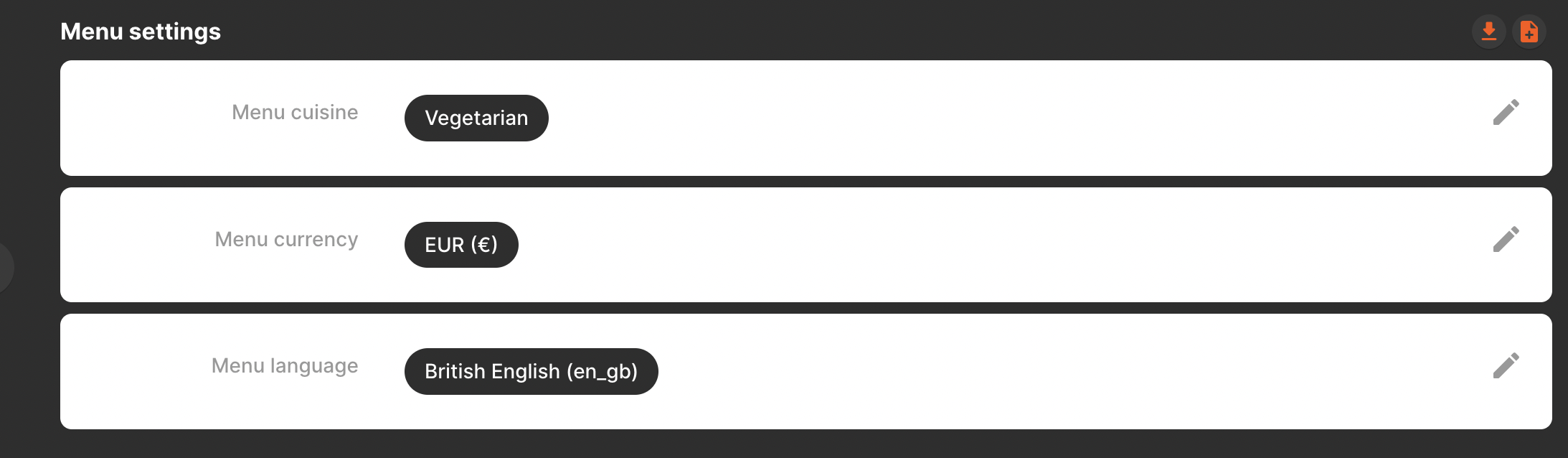
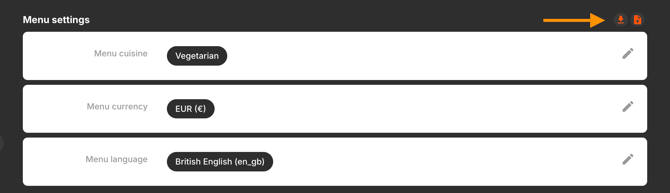
2\. The **menu settings** define the basic information of the menu, such as:
- **cuisine**: select one of the predefined options of the dropdown list that Google supports
- **currency**: select EUR (€), GBP (£) or UDS ($)
- **language**: select one of the options from the dropdown list. If your language is not available, please let your Customer Success manager know.
3\. Create your **menu sections,** such as *Starters*, *Main Courses, Desserts* and *Drinks*. You can add as many sections as you need.
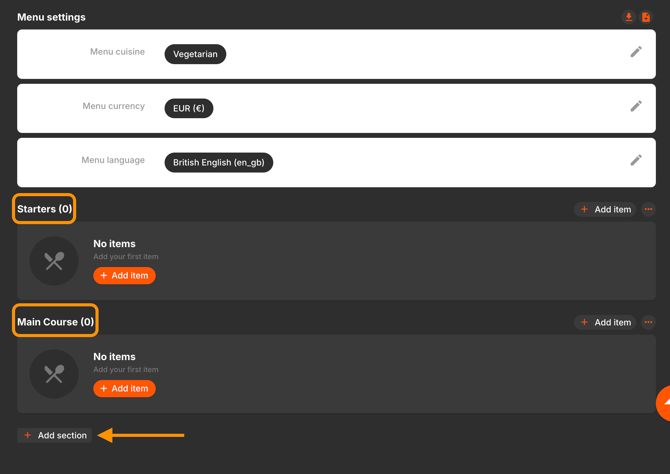
You may edit the section names, change their order or delete them from here:

4\. Once you have created at least one menu section, you can start adding **menu items** under each section.
- You may change the order of the items with the arrows
- Edit their details by clicking on the pen icon
- Delete the items not available by clicking on the bin icon.
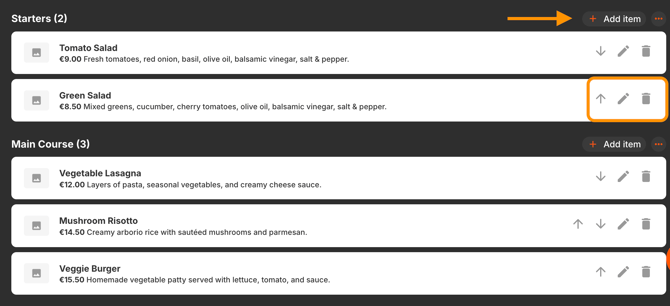
You may add the following **required** information for each menu item:
- **Name**: Add the title of the menu item, e.g. Green Salad (Required field)
- **Price**: Indicate the individual price of the menu item (Required field)
- **Description**: Short summary to describe the item and the ingredients,
e.g. **Green Salad** – A fresh mix of lettuce, spinach, cucumber, green bell pepper, avocado, and green onions, served with a light vinaigrette. (Required field)
There are some **optional** fields that can be filled with information:
- **Photo**: JPEG or PNG, Min 10KBs Max 5120 KBs. (Optional field)
- **Dietary restriction**: Select one of the predefined options: Halal, Kosher, Organic, Vegan or Vegetarian. (Optional field)
Currently, the **Google API** allows adding the following optional fields, please note that they are not yet available on **Google Business Profile** and will not be visible until Google decides displaying them.
- **Spiciness**: Indicate if your meal is: Hot, Medium, Mild or Spiciness undefined. (not yet available on Google)
- **Allergens:** select **one** or **several** of the options: Dairy, Egg, Fish, Peanut, Shellfish, Soy, Tree nut, Wheat. (not yet available on Google)
- **Calories:** Add the calories of the menu item. (not yet available on Google)
- **Serves:** Indicate the number of people that can be served by this food dish. (not yet available on Google)
5\. The menu information can be **exported** into CSV / or **imported** from here:
### How to import the menu with a file for all locations?
If you would like to import the menu information for several or all your venues, please follow these steps:
1\. Add a menu manually (as explained above in *How to add a menu manually in Localistico?)* for **one venue**, and then export it.
2\. In the exported CSV, each row represents a menu item for a specific venue. To duplicate for other venues:
- Duplicate the row/rows
- Remove **localistico\_location\_ID, location\_code, and location\_name**
- Replace **location\_code** with the new venue code
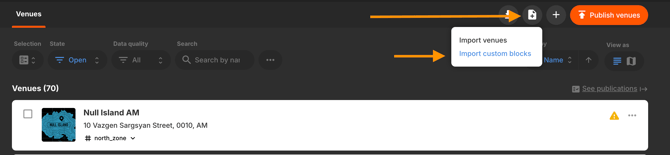
3. **Import** the file into Localistico:
Import from a file → Import Custom Blocks → Import Menu → Import Settings: Remove & overwrite with new ones → Upload
**Remember**: After importing, publish your locations on Google and your store pages if the menu is included on both platforms.
- [Getting Started](https://help.localistico.com/knowledge/getting-started?hsLang=en#main-content)
- [Basic Settings](https://help.localistico.com/knowledge/getting-started?hsLang=en#basic-settings)
- [Business Structure](https://help.localistico.com/knowledge/getting-started?hsLang=en#business-structure)
- [Integrations](https://help.localistico.com/knowledge/getting-started?hsLang=en#integrations)
- [Onboarding](https://help.localistico.com/knowledge/getting-started?hsLang=en#onboarding)
- [Frequently Asked Questions](https://help.localistico.com/knowledge/frequently-asked-questions?hsLang=en)
- [Locations](https://help.localistico.com/knowledge/locations?hsLang=en#main-content)
- [action links](https://help.localistico.com/knowledge/locations?hsLang=en#action-links)
- [Presence Management](https://help.localistico.com/knowledge/presence-management?hsLang=en#main-content)
- [An overview of profiles](https://help.localistico.com/knowledge/presence-management?hsLang=en#an-overview-of-profiles)
- [Claiming profile ownership](https://help.localistico.com/knowledge/presence-management?hsLang=en#claiming-profile-ownership)
- [Duplicated profiles](https://help.localistico.com/knowledge/presence-management?hsLang=en#duplicated-profiles)
- [Publications](https://help.localistico.com/knowledge/presence-management?hsLang=en#publications)
- [Reputation Management (Reviews, Q&A & Messages)](https://help.localistico.com/knowledge/reputation-management-reviews-qa-messages?hsLang=en#main-content)
- [Q&A](https://help.localistico.com/knowledge/reputation-management-reviews-qa-messages?hsLang=en#qa)
- [Reviews](https://help.localistico.com/knowledge/reputation-management-reviews-qa-messages?hsLang=en#reviews)
- [Private Messages](https://help.localistico.com/knowledge/reputation-management-reviews-qa-messages?hsLang=en#private-messages)
- [Metrics](https://help.localistico.com/knowledge/reputation-management-reviews-qa-messages?hsLang=en#metrics)
- [Analytics (Metrics & Reports)](https://help.localistico.com/knowledge/analytics-metrics-reports?hsLang=en#main-content)
- [Metrics](https://help.localistico.com/knowledge/analytics-metrics-reports?hsLang=en#metrics)
- [Reports](https://help.localistico.com/knowledge/analytics-metrics-reports?hsLang=en#reports)
- [Promotions (Paid Ads and Post Campaigns)](https://help.localistico.com/knowledge/promotions-paid-ads-and-post-campaigns?hsLang=en#main-content)
- [Google Ads](https://help.localistico.com/knowledge/promotions-paid-ads-and-post-campaigns?hsLang=en#google-ads)
- [Facebook Posts](https://help.localistico.com/knowledge/promotions-paid-ads-and-post-campaigns?hsLang=en#facebook-posts)
- [Google Posts](https://help.localistico.com/knowledge/promotions-paid-ads-and-post-campaigns?hsLang=en#google-posts)
- [Instagram Posts](https://help.localistico.com/knowledge/promotions-paid-ads-and-post-campaigns?hsLang=en#instagram-posts)
- [Post comments](https://help.localistico.com/knowledge/promotions-paid-ads-and-post-campaigns?hsLang=en#post-comments)
- [AI](https://help.localistico.com/knowledge/ai?hsLang=en)
- [Photos](https://help.localistico.com/knowledge/photos?hsLang=en)
- [Users and Passwords](https://help.localistico.com/knowledge/users-and-passwords?hsLang=en#main-content)
- [Users](https://help.localistico.com/knowledge/users-and-passwords?hsLang=en#users)
- [Passwords](https://help.localistico.com/knowledge/users-and-passwords?hsLang=en#passwords)
- [Settings](https://help.localistico.com/knowledge/settings?hsLang=en#main-content)
- [Business Info](https://help.localistico.com/knowledge/settings?hsLang=en#business-info)
- [Advanced Settings](https://help.localistico.com/knowledge/settings?hsLang=en#advanced-settings)
- [Platforms and Credentials](https://help.localistico.com/knowledge/platforms-and-credentials?hsLang=en#main-content)
- [Platforms](https://help.localistico.com/knowledge/platforms-and-credentials?hsLang=en#platforms)
- [Credentials](https://help.localistico.com/knowledge/platforms-and-credentials?hsLang=en#credentials)
- [Store Pages Portal](https://help.localistico.com/knowledge/store-pages-portal?hsLang=en#main-content)
- [Getting Started](https://help.localistico.com/knowledge/store-pages-portal?hsLang=en#getting-started)
- [Store Pages Portal - An Overview](https://help.localistico.com/knowledge/store-pages-portal?hsLang=en#store-pages-portal-an-overview)
- [Store Pages Portal - Locations](https://help.localistico.com/knowledge/store-pages-portal?hsLang=en#store-pages-portal-locations)
- [Store Pages Portal - Areas](https://help.localistico.com/knowledge/store-pages-portal?hsLang=en#store-pages-portal-areas)
- [Store Pages Portal - Pages](https://help.localistico.com/knowledge/store-pages-portal?hsLang=en#store-pages-portal-pages)
- [Store Pages Portal - Custom Attributes](https://help.localistico.com/knowledge/store-pages-portal?hsLang=en#store-pages-portal-custom-attributes)
- [Store Pages Portal - Settings](https://help.localistico.com/knowledge/store-pages-portal?hsLang=en#store-pages-portal-settings)
- [Store Pages Portal - Domains](https://help.localistico.com/knowledge/store-pages-portal?hsLang=en#store-pages-portal-domains)
- [Store Pages Portal - Themes](https://help.localistico.com/knowledge/store-pages-portal?hsLang=en#store-pages-portal-themes)
- [Plan & Billing](https://help.localistico.com/knowledge/plan-billing?hsLang=en)
- [Accounts Portal](https://help.localistico.com/knowledge/accounts-portal?hsLang=en)
- [Go to Localistico](https://localistico.com/)
- [Customer Portal](https://help.localistico.com/_hcms/mem/login?redirect_url=https%3A%2F%2Fhelp.localistico.com%2Ftickets)
- [Help & Support](https://help.localistico.com/knowledge)
[](http://localistico.com)
© Localistico 2020