
How does Localistico publish data to Google?
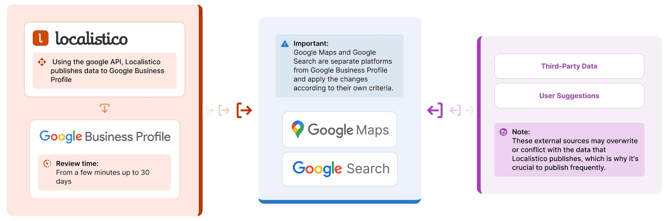
Localistico publishes data to Google Business Profile using the Google API.
Google Business Profile receives the submitted data, processes it according to its guidelines, and reviews the changes. Please note that this Google review process may take anywhere from a few minutes up to 30 days.
Once approved, Google Business Profile publishes the data on Google Maps and Google Search. Keep in mind that Google Business Profile is a separate platform from Google Maps and Google Search.
Google Maps and Google Search apply the changes according to their own criteria.
Please note that any discrepancies between Google Business Profile and what appears on Google Maps or Google Search are the responsibility of Google.
Additionally, Google Maps and Google Search may add extra information or make edits at any time. For this reason, we recommend publishing your data frequently from Localistico to ensure your profiles remain up to date with accurate information.
What data gets published on Google My Business
Here is a list of data that gets published from Localistico to Google My Business. The feature type indicates if it's standard (included for everyone) or if it's a premium feature and might not be included in your current subscription.
|
Data Type |
Description / Notes |
Feature Type |
|---|---|---|
|
Venue status |
Select open, temporarily closed or permanently closed. |
Standard |
|
Opening date |
Indicate when a new location opens soon. |
Standard |
|
Venue ID |
Unique identifier assigned to a specific location. |
Standard |
|
Venue Name |
Published to GBP if no brand name is activated. |
Standard |
|
Brand Name |
Published to GBP if it's activated for Google. |
Standard |
|
Publish Tags |
Premium feature, might not be included in your subscription. |
Premium |
|
Address & Coordinates |
Includes latitude, longitude, street & number, postal code & region. |
Standard |
|
Phone |
Only one main phone can be published on Google. |
Standard |
|
Service area |
Activate this option if your business offers service in an area. |
Standard |
|
Website |
Add a valid Website URL. |
Standard |
|
Social Links |
E.g. Facebook, Instagram, Youtube, Twitter, etc. Note that Google determines both the number of links and the order in which they appear on the profile. |
Standard |
|
WhatsApp Link |
The phone number should be written in full international format, without any zeroes, brackets, spaces, or dashes. Example: If your phone number is +34 662297955 Use: https://wa.me/34662297955 |
Standard |
|
UTM's |
Standard |
|
|
Action Links |
E.g., Appointments, Delivery, Reservation, Menu. Note: Availability of action links depends on the primary business category. For example, menu links are only available for restaurants or cafés. Note that Google can also display data from third-party providers. |
Standard |
|
Short and Long Summary |
If both are provided, Google only publishes the long summary. The short summary is published only if a long summary is not provided. |
Standard |
|
Categories |
The first category is the primary category and is the one visible on the Google profile. |
Standard |
|
Extended Attributes |
The primary category determines which attributes are eligible. |
Standard |
|
Opening hours, More hours and Special hours |
Include regular hours and any special hours (e.g., bank holidays, Christmas, or other special hours). |
Standard |
|
Photos |
Photos go through an automated review process, and Google may choose not to display certain images (e.g., low quality, blurry, or irrelevant photos). Even approved photos may appear less prominently than customer-uploaded images. Google determines the order of the photos on the profile. |
Standard |
|
Review replies |
Standard |
|
|
Posts |
Premium feature and might not be included in your subscription. |
Premium |
How Google adds information automatically to profiles
Google may fill in missing information or update business data— such as descriptions, menus, attributes, opening hours, or addresses using other online sources or user suggestions. To reduce incorrect or incomplete data, it’s recommended to provide as much information as possible in Localistico, ensuring the profile reflects accurate and complete information.
Here are some real examples of data that has been automatically updated by Google:
Business summaries
Google allows adding business descriptions to Google profiles. In addition to the general business description, Google sometimes adds an editorial summary automatically, which is a short phrase or sentence describing the business. Unlike the business description, the editorial summary cannot be edited, as it's completely managed by Google. From here you can find more information on the different types of summaries that can be published on Google.

Opening hours
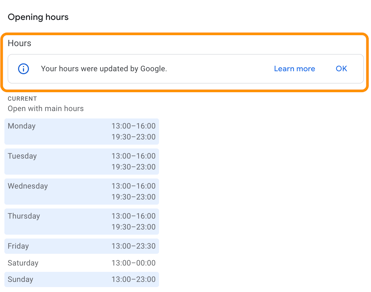
Google sometimes displays the message "Your hours were updated by Google" on Google Business Profile, it means that Google has automatically adjusted the business hours displayed on your profile.
Google sometimes updates business hours based on information it gathers from sources like user suggestions or website data. For example, if Google sees that the business's website shows different hours, it may update the profile automatically.
Sometimes Google updates hours for holidays, special events, or seasonal schedules, again based on trends or public info. Please note that while publishing from Localistico the automatic updates from Google will be overwritten.
Menu, Orders, Delivery, Pick-up & Reservations
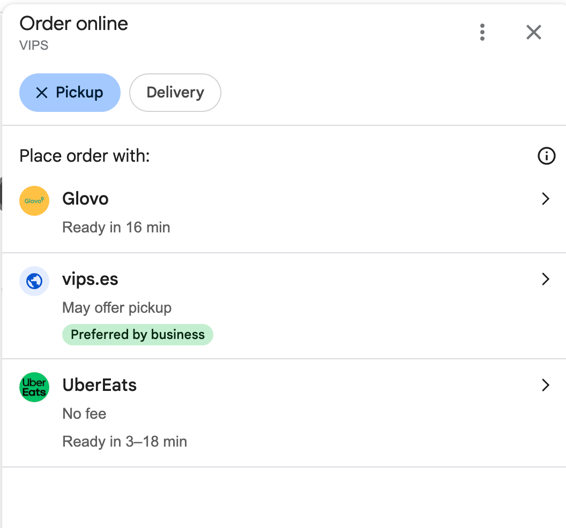
For menus specifically, Google sometimes displays data from third-party providers (e.g., Yemeksepeti), even if a business has added its own menu URL. Google may prioritise third-party data if it considers it more complete or reliable. Google also works with third-party platforms for orders, delivery, pick-up or reservations, which can automatically update links or data in the business profile. Here are some examples of profiles where Google has added automatically third party information:
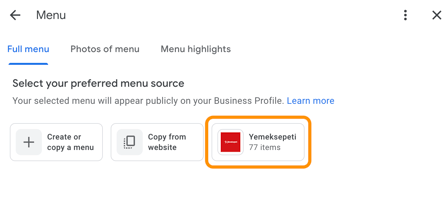
In order to remove the third-party menu, please contact the third-party provider directly and request the removal or correction of any inaccurate information. Apart from this, Google recommends adding the menu in the corresponding menu section. Here you can find more information on how to publish the menu from Localistico.
Please note that Google determines the order of the order & delivery links, even if the business has marked one option as "Company preference" other options can show up first in the ranking.
Attributes
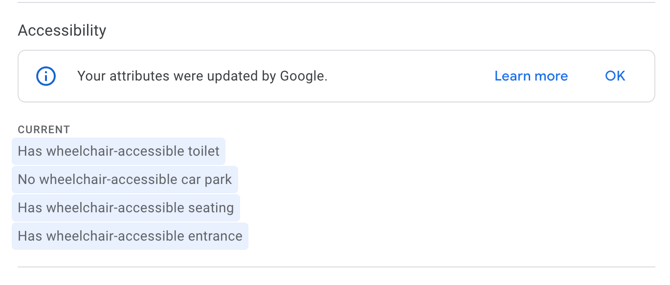
Similar to opening hours, Google sometimes automatically updates the attributes displayed on the profile based on user suggestions or other online sources. Publishing your data from Localistico will overwrite these changes and ensure the correct information is displayed.
Photos
Uploading images to your Google Business Profile does not guarantee they will appear publicly on Google Search or Maps. All photos go through an automated review process, and Google may choose not to display images that are low quality, blurry, or not clearly relevant to your business.
Even after approval, Google’s algorithm determines the order of photos and prioritises content that is most helpful or relevant to users. This means customer-uploaded photos—such as those attached to reviews—may appear more prominently than those uploaded by the business. Additionally, photos that receive more user interactions, such as views, clicks, or engagements, are more likely to be displayed prominently in the listing.